Physical Address
304 North Cardinal St.
Dorchester Center, MA 02124
Physical Address
304 North Cardinal St.
Dorchester Center, MA 02124

Navigating Salesforce Excellence
Navigating Salesforce Excellence
A proven five step workflow for Claude for Salesforce admins: connect it to your org read-only, brief it with real API names, make it plan before it builds, document your conventions, and set clear limits.
Most advice about Claude for Salesforce admins stops at “ask it to write your Apex.” That is the shallowest thing you can do with it, and it is why a lot of admins try it once, get a hallucinated field name back, and give up.
The difference between a toy and a genuinely useful assistant comes down to setup and habits. This guide walks through the five step workflow that actually works, in the order you should adopt it.
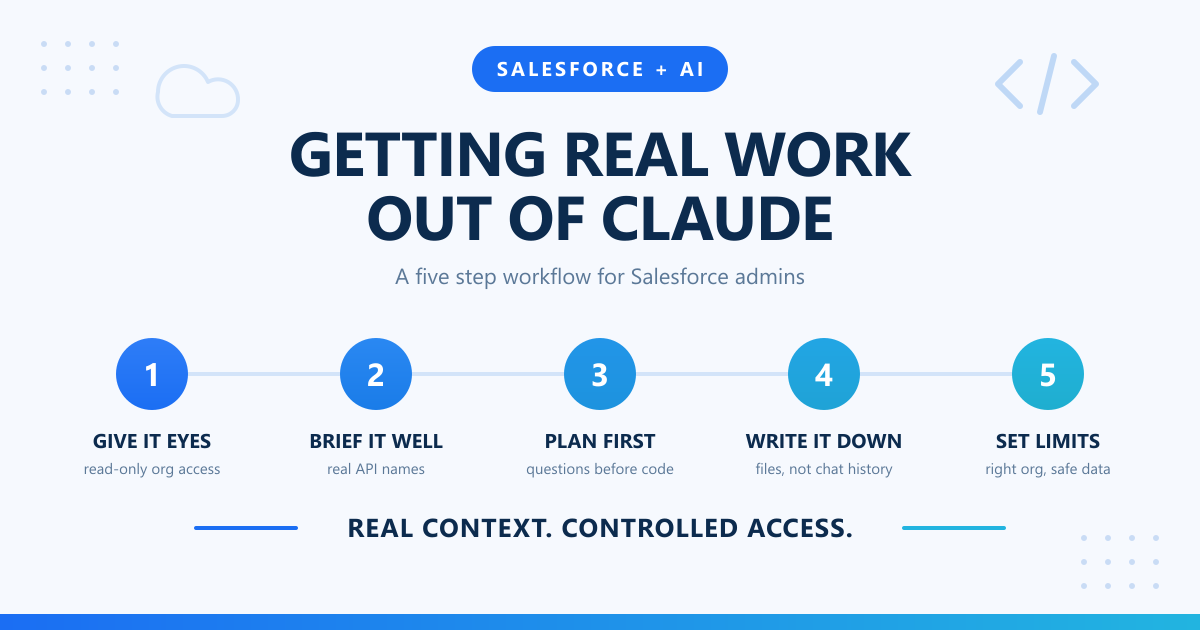
An AI that cannot see your org is guessing. It does not know that your Account object has 140 custom fields, or that someone built a validation rule in 2019 that still blocks half your integrations. Ask it anything org-specific and it will invent something plausible.
Connecting it to your org through a Salesforce MCP server changes the dynamic entirely. Instead of guessing, it can:
Start read-only. Let it query and inspect, but not create, update, or delete. You get most of the value on day one, and you find out quickly whether it actually understands your org before it has permission to change anything in it. Widen the scope later, once it has earned it.
This staged approach is the single most important habit for Claude for Salesforce admins. An assistant with read access can be wrong and cost you nothing but a minute of reading. An assistant with write access can be wrong and cost you a weekend.
If you have already experimented with AI tooling inside your development workflow, this will feel familiar. It is the same idea behind using Einstein for Salesforce developers in VSCode, just applied to admin work instead of code completion.
This is the single biggest quality gap in how people prompt. Compare:
Opportunity_Close_Notification fails on Opportunity update when StageName moves to Closed Won. Error: FIELD_CUSTOM_VALIDATION_EXCEPTION, Contract_Signed_Date__c is required.”The second gets a usable answer on the first attempt. Every good prompt includes:
That last point matters more than people expect. If you have already checked the validation rules and confirmed the field is populated, say so. Otherwise you will get those suggestions back first, and you will waste a round trip rejecting them.
A vague question does not produce a cautious answer. It produces a confident wrong one. This matters most with exceptions, where the stack trace carries the information that actually identifies the problem. If you are working through Apex errors, our walkthrough on exception handling in Apex unit tests covers the patterns worth knowing before you ask for help.
When a build goes wrong, the mistake is almost never in the syntax. It is in an assumption nobody stated out loud. So stop it from building at all until it has asked:
“Before you write anything, ask me every question you need answered to get this right.”
You will get back the questions you skipped:
Answering six questions up front is cheaper than unwinding a bad build in production. Governor limits belong in that conversation too, especially now that Apex heap limits have increased in Winter ’27 and the old assumptions about what fits in memory no longer hold.
If you are typing the same context into every new conversation, that context belongs in a file. Keep a Markdown document covering:
Chat history is not documentation. It vanishes, your team cannot review it, and nobody else benefits from what you worked out. A file can be version controlled, corrected when it goes stale, and handed to the next admin.
Start smaller than you think. Twenty lines covering your naming conventions and your three most dangerous automations will improve every answer you get. You can grow it as you notice yourself repeating context.
Two things worth being strict about:
The same caution applies to anything touching user access. Admin actions that change who can log in or what they can see deserve a second pair of eyes, whether or not an AI suggested them. If you are handling credentials or login problems, our guide on resetting a Salesforce user password covers the safe path.
Here is what the full workflow looks like on a real request: “Sales wants an alert when a high value opportunity has been sitting in Negotiation for more than fourteen days.”
Step one, context. With read-only org access, it checks what already exists on Opportunity. It finds two record-triggered flows and a process builder nobody has touched since 2021. That last one matters, and you would not have thought to mention it.
Step two, briefing. You supply the specifics: high value means Amount over 50,000, the alert goes to the Opportunity Owner and their manager, and Negotiation is the API value Negotiation/Review, not the label.
Step three, questions before building. It comes back with three you had not considered. Should the timer reset if the stage changes and comes back? What happens when the owner is inactive? Should closed-lost opportunities be excluded retroactively? Two of those change the design.
Step four, the build. Now it proposes a scheduled path on an existing flow rather than a new one, because it saw the existing automation in step one and knows another trigger would compete with it.
Step five, boundaries. You confirm you are in the sandbox, deploy there, and test with sample records rather than pasting real pipeline data into a chat window.
The total time is not much shorter than doing it yourself. The difference is that the design questions surfaced before the build instead of after go-live.
Being honest about the limits is what keeps this useful. A few places to be careful:
That last one is the real boundary. The value scales with your own expertise, not in place of it.
If you want to try this without disrupting anything, work in this order:
It is also worth keeping your platform knowledge current alongside the tooling. Release notes and Trailhead still do the heavy lifting there, and an assistant is far more useful when you already know enough to catch it being wrong.
Read-only access to production is reasonable once you trust the setup, and it is genuinely useful for investigating live issues. Write access to production is a different decision and should follow your normal change management process rather than bypassing it.
MCP is a standard way for an AI assistant to call external tools. A Salesforce MCP server exposes org operations such as running SOQL or reading object schemas, so the assistant works against your real configuration rather than guessing from training data.
No, and the workflow above explains why. Every step depends on someone who knows the org well enough to brief it properly and catch a wrong answer. It removes tedium, not judgement.
Substantially, and mostly by preventing a specific failure. Without org access the assistant invents field names that sound right. With it, answers reference what is really configured, which is the difference between a suggestion you can act on and one you have to verify line by line.
Give it real context, and stay in control of what it can touch.
The mental model that works: treat it as a sharp new hire who knows Salesforce properly but has never seen your org, your history, or your conventions. Brief it like you would brief a person, give it access in stages, and check its work. Do that and it stops being a novelty and starts saving you real hours.